 Click to
expand
Click to
expandEven if you don’t use todo.txt, you might appreciate this article, as yet another show of fzfm’s versatility. (Or rather, fzf’s and fish’s!)
todo.txt is a very simple file format for todo lists. Most people don’t know about it, so here’s a quick summary of the format, ignoring “completed” tasks:
+project, @contextdue:yyyy-mm-ddThat’s it. Oh, and one other thing. Each line in the file stands on its own. The order in which they appear in the file does not matter as long as the tool you’re using is able to sort it out. (Though I do keep it sorted, because I have a little OCD!)
There are many many programs and apps that can handle this format, though on Linux, at the command line, there’s only one. And I hate it. It’s an over-engineered piece of code with too many features I don’t use, yet lacks the ability to sort by due date, something I consider absolutely essential.
So, f that. I can do better with my own script to get the basic colors as I want them, and my trusty fzfm (can we still call this a file manager?) script can do the rest, along with vim and some commonly available tools like fd, rg, etc.
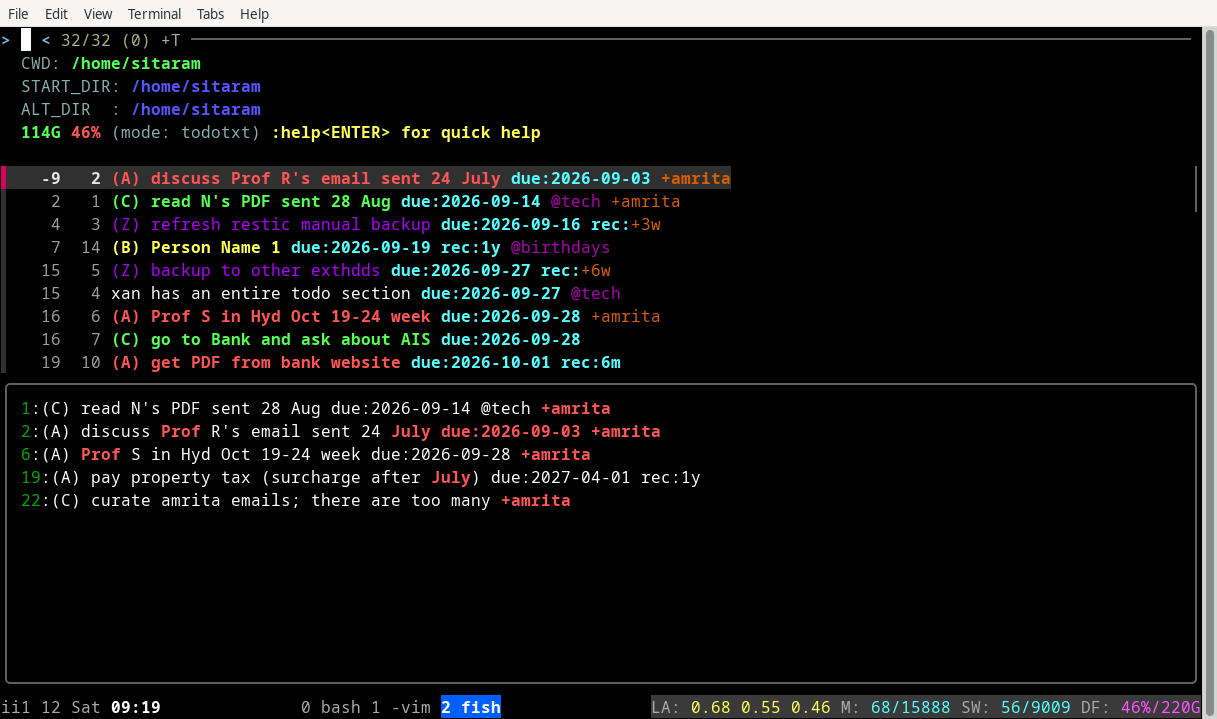
fzfm -m t gets you into “todotxt” mode:
Notice the mode indicator on the fifth line.
The “todotxt” mode of fzfm prefixes two numbers to each line, only for display. The first number is the number of days before the due date of this task. I find that much more useful than mentally trying to look at the date and figure out how far away it is. (This screenshot was taken on 2026-09-12, so you can see the first task is 9 days overdue. Don’t worry, this is dummy data; I don’t usually ignore tasks for that long a period!)
The second number is the line number within the file. When you hit alt-e on a line, the tool uses this number and positions the Vim editor at that line.
The rest of the line is as per the format I described earlier.
The preview window is where things get interesting. It shows you all the lines in the file which contain either the same project as the current line, the same context as the current line, or any of the words in the current line which start with an uppercase letter.
Here’s a screen showing matching contexts:
It’s pretty nice to see all other birthdays when you focus on a line
with the @birthday context.
This is the code for initialising the mode:
case "init"
    set view_cmd "todo"
    set preview_cmd "echo {} |
        rg -o -w -e 'due:20..-..-..' -e '@\S+' -e '\S*\+\w\S+' -e '[A-Z]\w+' |
        rg -v 'rec:\+' | rg -n -w --color=always -F -f - $TODO_FILE"
    set preview_window "bottom"
    set -g fzfm_mode_keys alt-e,alt-S
This is what runs when you hit alt-e on a line, to edit the todo file at that line:
case "alt-e"
    # edit current or first selection
    echo $selection[1]|read dummy1 n dummy2
    vim $TODO_FILE +$n
Oh and I forgot to mention that there’s also a quick-and-dirty “sort the file in-place by due date” feature:
case "alt-S"
    vim $TODO_FILE -c 'so '(printf %s\n "sort i" "sort /due:/" "g/due:/move 0" "g/due:/move 0" wq | psub)
    # this is much more complicated in *any* language; I challenge you
    # to find something just as easy!
That’s it. Other than boilerplate, there’re basically 9 lines of code!
This is not part of fzfm. It’s my replacement for https://github.com/todotxt/todo.txt-cli/blob/master/todo.sh.
Here’s the full “todo” script, which I only use for display. Everything else I do within vim.
#!/bin/fish

function sort_by_days_left
    perl -MTime::Piece -e '
        my $today = localtime;

        open(STDOUT, "|-", "env LANG=C sort -f -k1,1n -k3 | sed -e \"s/^9999/   -/\"");

        while (<>) {
            $ln = sprintf "%3d", $.;
            unless (/due:(20..-..-..)/) {
                print "9999 $ln $_";
                next;
            }

            my $d2    = Time::Piece->strptime($1, "%Y-%m-%d");
            my $days = int($d2->epoch/86400) - int($today->epoch/86400);
            printf "%4d $ln %s", $days, $_;
        }
    '
end

set rgn --passthru --color=always --colors=match:style:nobold
set rgb --passthru --color=always --colors=match:style:bold

set l (string length (wc -l < $TODO_FILE))
# set perlexp '$x=$.++; printf "%0'$l'd ", $x'

set to cat
test -t 1 && set to less

# perl -pe $perlexp < $TODO_FILE |
sort_by_days_left < $TODO_FILE |
    rg $rgn --colors=match:fg:160,160,160   -e '^ *\d+ +\d+ ' |
    rg $rgb --colors=match:fg:red           -e '\(A\).*' |
    rg $rgb --colors=match:fg:yellow        -e '\(B\).*' |
    rg $rgb --colors=match:fg:green         -e '\(C\).*' |
    rg $rgn --colors=match:fg:115,155,235   -e '\(W\).*' |
    rg $rgn --colors=match:fg:155,0,235     -e '\(Z\).*' |
    rg $rgb --colors=match:fg:cyan          -e '\S+:\S+' |
    rg $rgn --colors=match:fg:160,0,160     -e '@\S+' |
    rg $rgn --colors=match:fg:225,105,0      -e '\+\S+' |
$to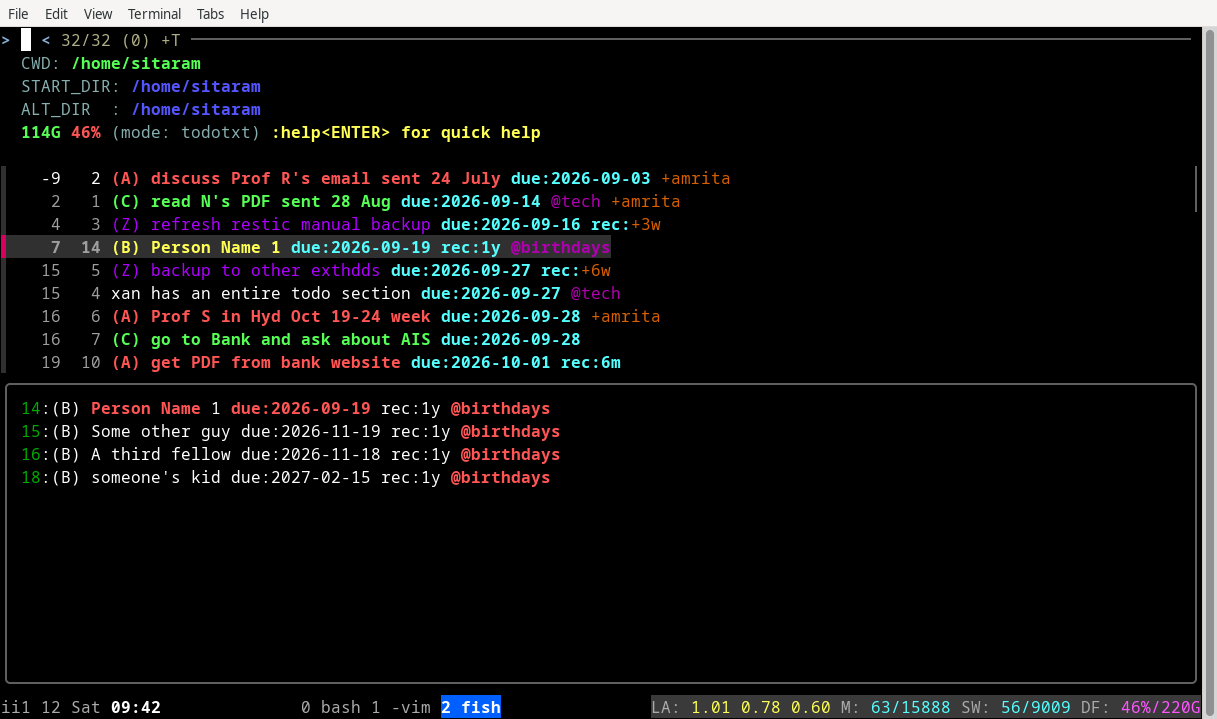 Click to
expand
Click to
expand